BOGO: Buy X Get Different Y
BOGO stands for Buy one, get one. You define two different groups of products – the Buy and the Get. The amounts don’t have to be one.
Promo examples:
- "Buy a pair of pants, get a t-shirt for free."
- "Buy two pairs of pants, get 3 t-shirts with 50% discount."
BOGO works on 2 different product groups, while N + M / Each N works within one product group. In “Buy a pant, get a t-shirt for free” the customer has to add a pant to the cart in order to get a t-shirt for free, so it is a BOGO. In “1+1 on all t-shirts or pants” the customer can add any products from within the t-shirts and the pants group, so it is an Each N.
Configuration
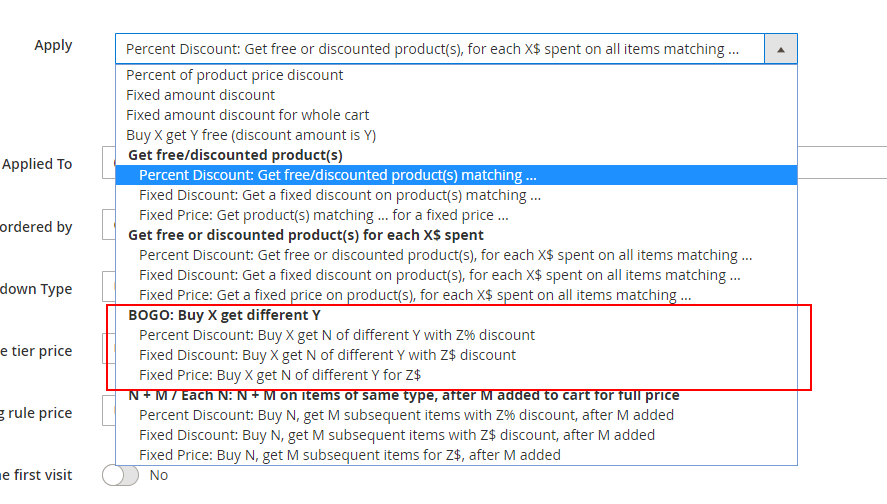
In the actions list, under “BOGO: Buy X get different Y”, you can choose the Percent Discount, Fixed Discount or Fixed Price sub actions -
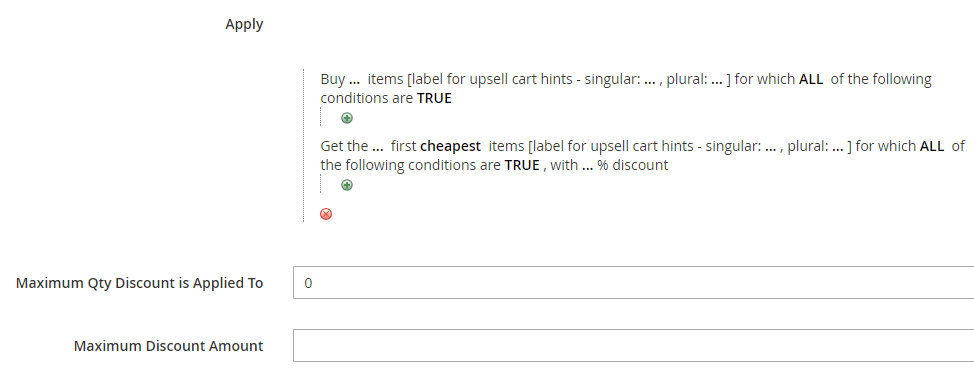
Once selected, the following fields will show up -
Fields explanation
- Buy … items – number of “Buy” items that the customer needs to buy in order to get the discount on the “Get” items.
- Buy … items label for cart hints – singular / plural – the name that will show up in the cart hints, representing the “Buy” items.
- Items for which ALL of the following conditions are TRUE [top] – the conditions that define the “Buy” items.
- Get the … first – number of “Get” items that the customer gets discounted per “Buy” items.
- Get the … first … label for cart hints – singular / plural – the name that will show up in the cart hints, representing the “Get” items.
- First cheapest / most expensive items – the order of items by which the discount is getting applied on the “Get” items.
- Items for which ALL of the following conditions are TRUE [bottom] – the conditions that define the “Get” items.
- With …% discount – the discount percent that will be applied on the “Get” items.
- Maximum Qty Discount is Applied To – maximum total quantity of “Get” items that the discount can be applied to.
- Maximum Discount Amount – maximum discount amount that the customer can get in their cart using this promotion.
The “Buy” items must be distinct from the “Get” items, for the same reasons as in Get free / discounted product(s) for each $X spent.
BOGO – Percent Discount
Example
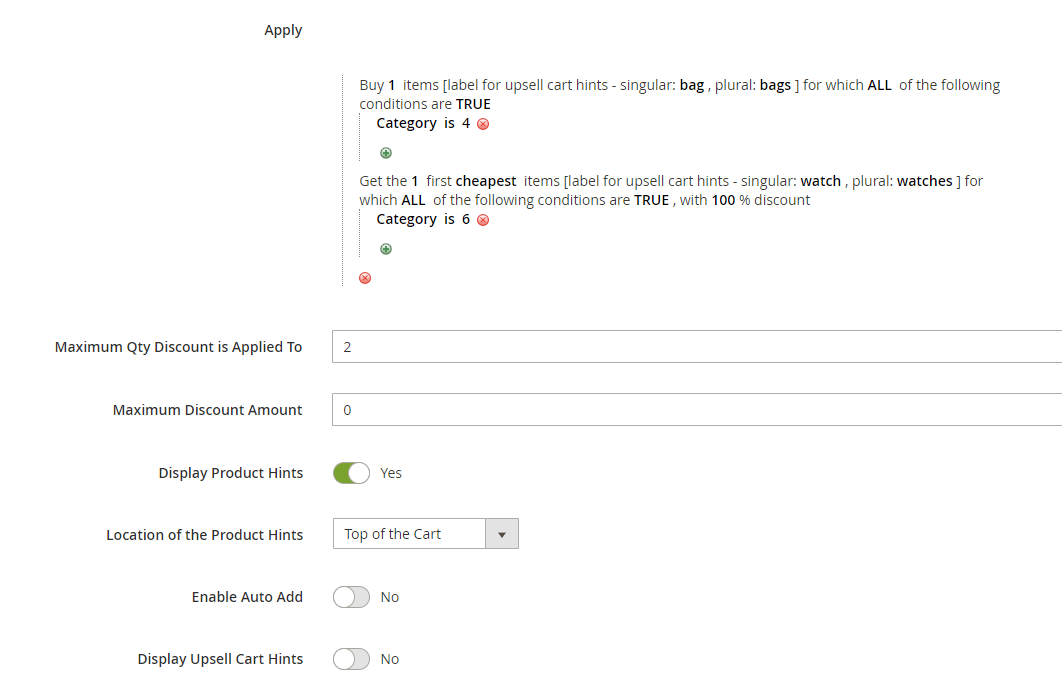
The rule in this example is – “Buy a bag, get a watch for free”. (Note: In our example, bag is any product that belongs to category 4 and watch is any product that belongs to category 6.)
The “maximum discount qty” is 2, that is, the customer can get up to 2 free watches using this promotion. The “items order type” is “cheapest”, that is, the watches in the cart will be discounted in the order from the cheapest to the most expensive. The “Location of the Product Hints” is set to “Top of the Cart”.
Cart examples for this rule:
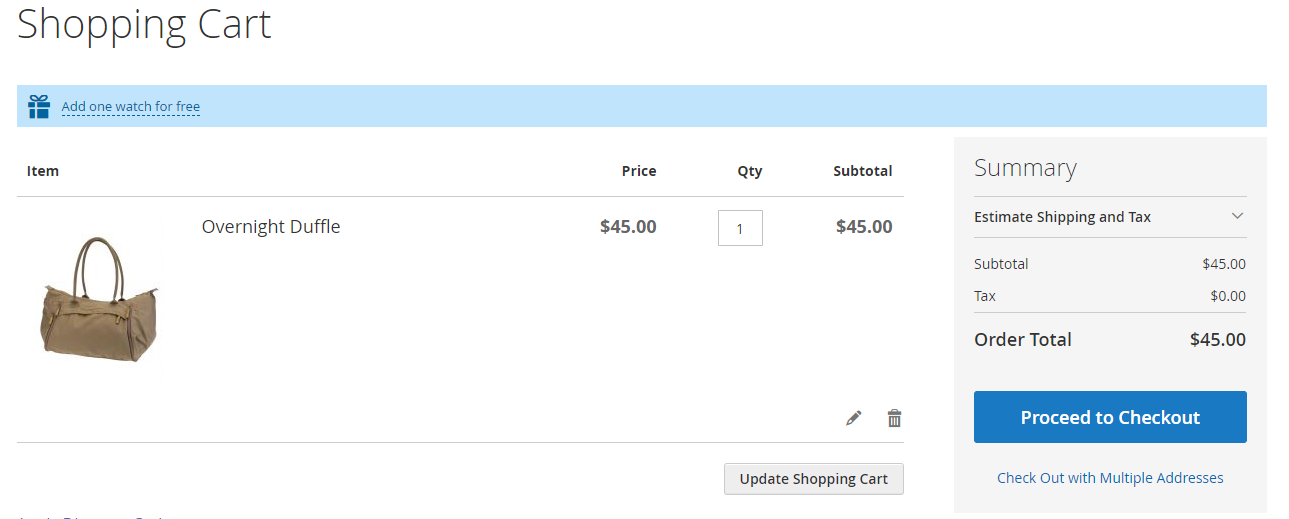
- The customer adds one bag to the cart. The product hint message “Add one watch for free” shows up at the top of the cart, because we set the “Location of the Product Hints” to “Top of the Cart” –
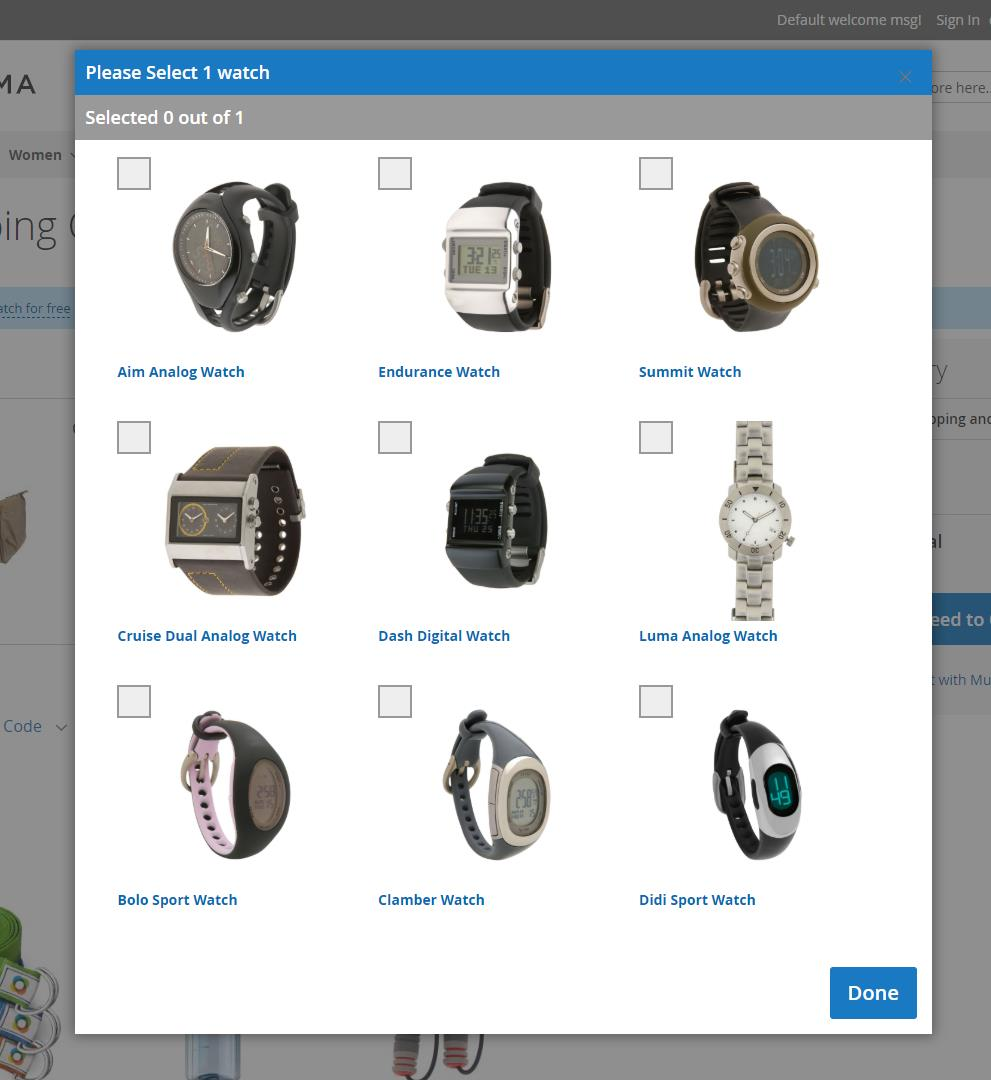
- The customer clicks on the product hint. They get a popup that lets them select their free watch -
BOGO – Fixed Discount
Example
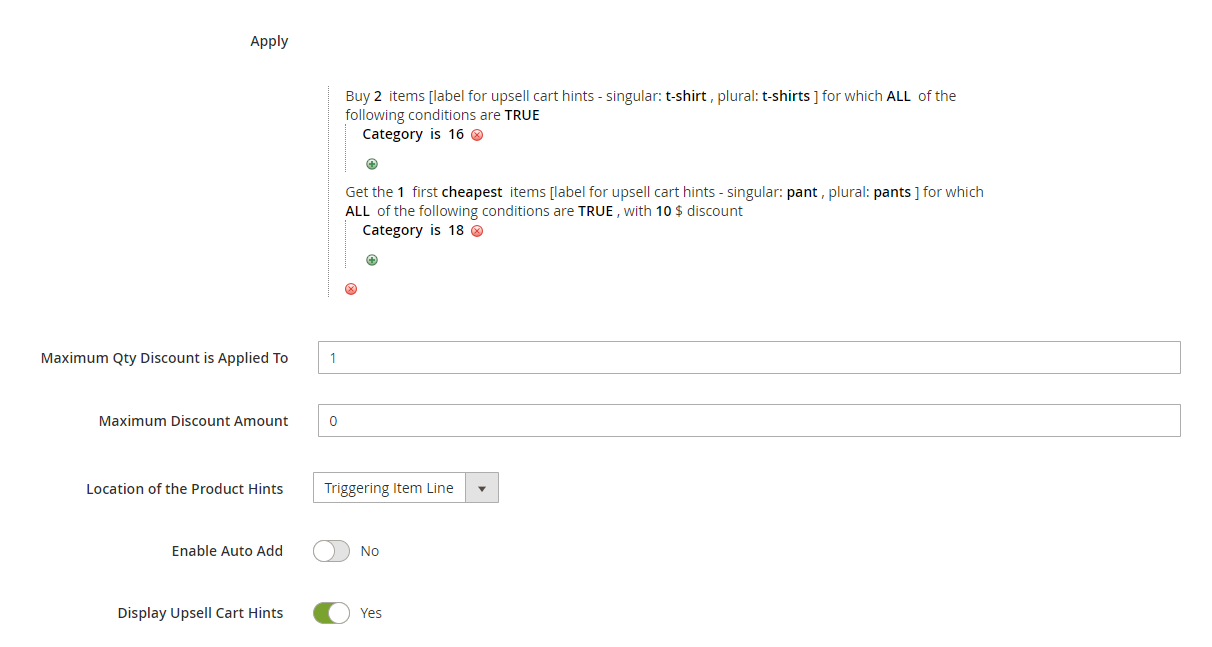
The rule in this example is – “Buy 2 t-shirts, get pants with $10 discount”. (Note: In our example, t-shirt is any product that belongs to category 16 and pant is any product that belongs to category 18.)
The “maximum discount quantity” is 1, that is, the customer can get the $10 discount only one time using this promotion.
Cart examples for this rule:
- The customer has one t-shirt in their cart. The upsell cart hint is “Add one more t-shirt, to get one pant with $10 discount!”.
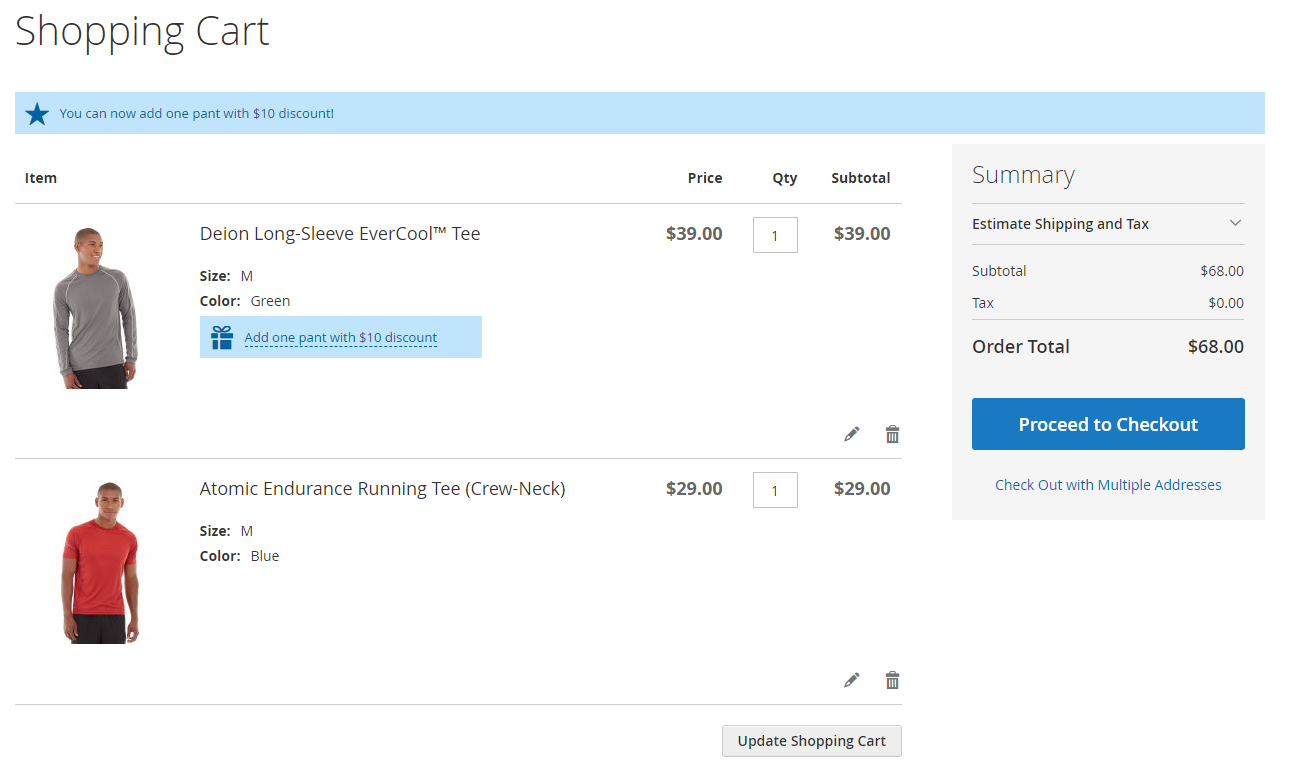
- The customer adds another t-shirt to the cart and goes to the cart. The upsell cart hint message is “You can now add one pant with $10 discount!”. The product hint “Add one pant with $10 discount” shows up next to one of the t-shirts -
- The customer clicks the product hint. They get a popup that lets them select their discounted pair of pants.
- There are no more hints showing up in the cart. Also, if the customer adds 2 more t-shirts and one pant – they won’t get an extra discount. That is because the “Maximum Qty Discount is Applied To” is 1.
BOGO – Fixed Price
Example
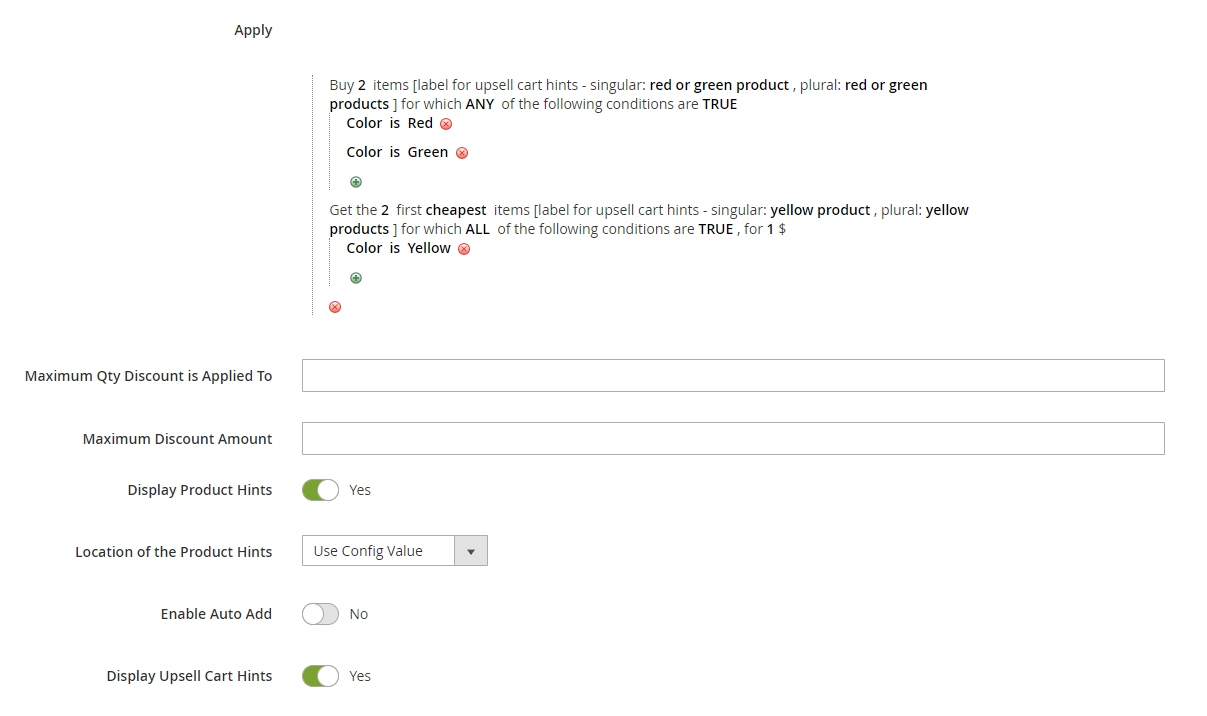
The rule in this example is – “Buy 2 red or green products, get 2 yellow products for $1 only each”.
Cart examples for this rule:
- The customer adds one red t-shirt to the cart. In the cart they see the upsell cart hint “Add one more red or green product, to get 2 yellow products for $1 only each!”
- The customer adds green shorts to the cart. There is an upsell cart hint in the cart – “You can now add 2 yellow products for $1 only each!”. There is a product hint next to one of the red / green products saying “Add 2 yellow products for $1 only each”.