Displaying the order discount on the success page in Magento 2
In this article, we will implement a Magento plugin to display the order total discount and the discount percent total on the order success page.
The calculation of the discount totals in Magento 2
We will use the following calculation to calculate the total discount of the order in our Magento 2 module. Note that the discount_amount field in the order includes the shipping discount, so we don't need to sum it up.
$discountAmount = abs($order->getDiscountAmount());
We will use the following calculation to calculate the total discount percent of the order. Note that we add the shipping_amount as the denominator because the subtotal in Magento doesn't include the shipping amount.
$discountPercent = ($discountAmount / ($order->getSubtotal() + $order->getShippingAmount()))*100;
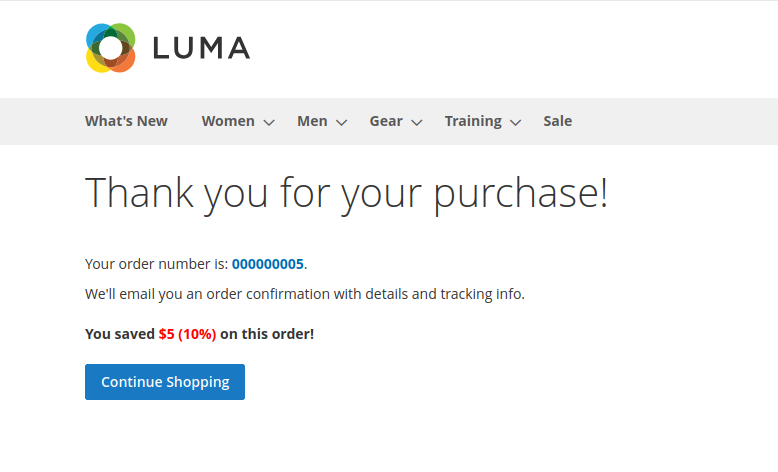
How it will look like
We will add some CSS to our module, so the discount total will have a margin, and the amount will be marked in a red color.
Here is how it will look:
The code of the module
Let's see the plugin code that gets the full order discount and displays it on the order success page.
First, let's create the basic plugin structure in app/code/Mexbs/DisplayDiscountOnSuccessPage and the following files:
<?php
\Magento\Framework\Component\ComponentRegistrar::register(
    \Magento\Framework\Component\ComponentRegistrar::MODULE,
    'Mexbs_DisplayDiscountOnSuccessPage',
    __DIR__
);
<?xml version="1.0"?>
<config xmlns:xsi="http://www.w3.org/2001/XMLSchema-instance" xsi:noNamespaceSchemaLocation="../../../../../lib/internal/Magento/Framework/Module/etc/module.xsd">
    <module name="Mexbs_DisplayDiscountOnSuccessPage" setup_version="1.0.0" />
</config>
Now, let's create the layout file that hooks to the success page and adds our template.
<?xml version="1.0"?>
<page xmlns:xsi="http://www.w3.org/2001/XMLSchema-instance" xsi:noNamespaceSchemaLocation="urn:magento:framework:View/Layout/etc/page_configuration.xsd">
    <head>
        <css src="Mexbs_DisplayDiscountOnSuccessPage::css/success.css"/>
    </head>
    <body>
        <referenceContainer name="order.success.additional.info">
            <block class="Mexbs\DisplayDiscountOnSuccessPage\Block\OrderSuccessShowDiscount"
                   name="mb.order.success.show.discount"
                   template="Mexbs_DisplayDiscountOnSuccessPage::order-success/show-discount.phtml"
                    />
        </referenceContainer>
    </body>
</page>
<?php
/**
 * @var $block \Mexbs\DisplayDiscountOnSuccessPage\Block\OrderSuccessShowDiscount
 */
$discountData = $block->getOrderDiscountAmountAndPercent();
if(isset($discountData['discount_amount']) && $discountData['discount_amount'] > 0
    && isset($discountData['discount_percent']) && $discountData['discount_percent'] > 0): ?>
<div class="saved-discount"><strong><?= __('You saved <span class="saved">$%1 (%2%)</span> on this order!', $discountData['discount_amount'], $discountData['discount_percent']) ?></strong></div>
<?php
endif;
<?php
namespace Mexbs\DisplayDiscountOnSuccessPage\Block;

class OrderSuccessShowDiscount extends \Magento\Framework\View\Element\Template
{
    protected $onepage;
    public function __construct(
       \Magento\Framework\View\Element\Template\Context $context,
       \Magento\Checkout\Model\Type\Onepage $onepage,
        array $data = []
    )
    {
        parent::__construct($context, $data);
        $this->onepage = $onepage;
    }
    public function getOrderDiscountAmountAndPercent()
    {
        $session = $this->onepage->getCheckout();
        $order = $session->getLastRealOrder();
        $discountAmount = abs($order->getDiscountAmount());
        $discountPercent = ($discountAmount / ($order->getSubtotal() + $order->getShippingAmount()))*100;

        return [
            "discount_amount" => $discountAmount,
            "discount_percent" => $discountPercent
        ];
    }
}
.saved-discount{
    margin: 20px 0;
}
.saved-discount .saved{
    color: red;
}
Installing the module
Now, we need to run the usual commands to enable the module, compile the code, etc:
php bin/magento module:enable Mexbs_DisplayDiscountOnSuccessPage
php bin/magento setup:di:compile
php bin/magento setup:static-content:deploy -f
php bin/magento cache:flush
Testing the module
To test the module, add some products to the cart and make sure that a discount is applied. Complete the checkout. As we showed before, you should see a message similar to this on the Magento order success page:
To sum up
In this article, we showed how to get the order discount on the success page in Magento 2 and display it together with the total percent of the discount in the order.
This code was tested on Magento CE 2.4.7-p3